In the intricate world of network security, strong encryption is non-negotiable. At the heart of many secure communication protocols, like SSH, IPsec VPNs, and HTTPS, lies the power of RSA keys. For network administrators managing Cisco devices, understanding how these critical cryptographic elements are generated is fundamental to building a resilient and secure infrastructure. This guide will demystify the process, from the foundational commands to advanced security considerations, ensuring your Cisco environment is fortified against modern threats.
The Core Command: Generating RSA Keys on Cisco Devices
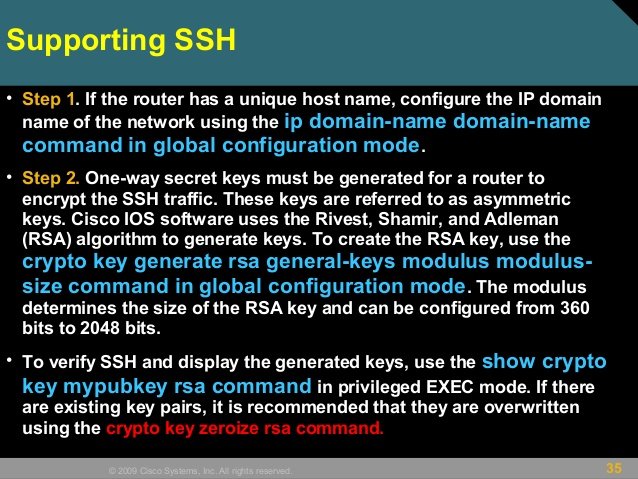
At its most basic, when you ask "what does Cisco use to generate RSA keys," the answer points directly to a crucial command: crypto key generate rsa executed in global configuration mode. This simple yet powerful command is the gateway to creating the cryptographic pairs that secure your network communications. It's designed to be straightforward, walking you through the generation process.
When you issue this command, Cisco devices create a pair of keys: a public key and a corresponding private key. These two are intrinsically linked, forming the basis of asymmetric encryption. If your device already has existing RSA keys, the system will wisely prompt you to confirm if you wish to replace them, preventing accidental overwrites. To truly grasp the cryptographic principles underpinning these operations, you'll find immense value in exploring the Cisco RSA Key Fundamentals guide, which delves into the core concepts of RSA encryption and its role within Cisco networking.
Essential Prerequisites for Key Generation
Before you can successfully run the crypto key generate rsa command, your Cisco router needs to meet a couple of basic prerequisites. Specifically, it must have both a hostname and an IP domain name configured. You establish these using the hostname and ip domain-name commands, respectively. Without these identifiers, the device cannot properly generate and name its RSA keys, unless you are opting for a named key pair, which offers more flexibility.
During the generation process, you'll also be prompted to select between two mutually exclusive types of RSA key pairs: special-usage keys and general-purpose keys. Each serves distinct security roles within the Cisco ecosystem, allowing you to tailor your key usage to specific application requirements. Understanding these distinctions is key to secure deployment.
Where RSA Keys Reside: Security and Storage Considerations
Once generated, the RSA keys become an integral part of your Cisco device's secure identity. It's important to note that while you execute the crypto key generate rsa command, the command itself is not saved in the router's running or startup configuration. This is a deliberate security measure. Instead, the generated RSA keys are securely stored in a private configuration area within the device's NVRAM (Non-Volatile Random-Access Memory).
This private storage location is intentionally designed for maximum security. The keys are never displayed to the user, nor are they backed up to another device, preventing unauthorized access or accidental exposure. This robust protection ensures the integrity and confidentiality of your device's cryptographic identity. For a deeper dive into the practical steps and considerations when managing these keys, learning how to Generate RSA keys on Cisco devices offers invaluable hands-on guidance.
SSH and Automatic Key Generation
An interesting aspect of RSA key management on Cisco devices involves SSH (Secure Shell). If a router lacks any existing RSA keys, but SSH is configured and initiated, the device may automatically generate an additional RSA key pair specifically for SSH's use. These keys are typically named in a structured format, such as "{router_FQDN}.server" (e.g., "router1.cisco.com.server"), ensuring a unique identifier for SSH sessions. This automatic provisioning helps maintain basic SSH connectivity even when manual RSA key generation hasn't been performed.
Elevating Security: Cisco Hardware Security Modules (HSMs)
While the crypto key generate rsa command provides a solid foundation for key generation, some high-security environments demand even greater protection. This is where Cisco's Hardware Security Modules (HSMs) come into play. HSMs are dedicated physical devices designed to safeguard cryptographic keys and perform cryptographic operations within a tamper-resistant module. They offer a significantly enhanced layer of security, protecting keys from software vulnerabilities and physical tampering.
For organizations with stringent compliance requirements or those handling highly sensitive data, integrating HSMs into their Cisco infrastructure can be a game-changer. These modules ensure that private keys never leave the secure boundary of the hardware, providing cryptographic assurance at the highest level. To explore the advanced capabilities and deployment considerations for this robust security measure, check out our guide on Cisco HSM RSA Key Generation.
Fortifying Your Defenses: Best Practices for RSA Key Management
Generating RSA keys is just the first step; proper management is paramount to maintaining a secure network. Adhering to best practices ensures the longevity and effectiveness of your cryptographic defenses. This includes periodically rotating keys, securing access to devices capable of generating or managing keys, and implementing strong policies for key strength and usage. For instance, using longer key lengths (e.g., 2048-bit or 4096-bit) is crucial to withstand increasingly powerful computing capabilities.
Neglecting key management can open doors to vulnerabilities, potentially compromising your entire network. By proactively managing the lifecycle of your RSA keys, you bolster your network's resilience. For a comprehensive strategy on safeguarding these vital assets, dive into our resource on Best practices for Cisco RSA keys.
Navigating Challenges: Troubleshooting Cisco RSA Key Generation
Even with a clear understanding of the process, you might occasionally encounter issues when generating RSA keys on Cisco devices. Common problems range from missing prerequisites like the hostname or IP domain name, to conflicts with existing keys, or even unexpected system behavior. Errors can also arise from incorrect command syntax or insufficient user privileges.
When facing difficulties, a methodical troubleshooting approach is essential. Verify all prerequisites, check system logs for error messages, and ensure your device's software version supports the desired key generation parameters. Knowing how to diagnose and resolve these hiccups efficiently will save you valuable time and reduce potential security exposures. If you're running into snags, our dedicated guide can help you Troubleshoot Cisco RSA key generation effectively.
Building a Secure Future with Cisco RSA Keys
Understanding "what does Cisco use to generate RSA keys" is more than just knowing a command; it's about appreciating a fundamental pillar of modern network security. From the initial crypto key generate rsa command to the advanced protection offered by HSMs, Cisco provides robust tools for securing your digital assets. By leveraging these tools effectively and adhering to best practices, you empower your network to communicate securely and withstand the ever-evolving landscape of cyber threats, ensuring the integrity and confidentiality of your critical data for years to come.